Inkpad Notepad & To do list
WorkpailProductivity
4.552.07K Reviews
- Version
- Varies With Device
- Installs
- 10.00M
- Age Rating
- Everyone
Screenshots
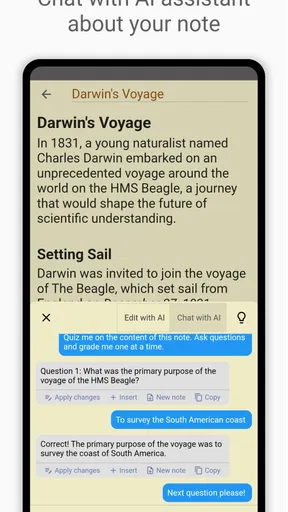
Our Review of Inkpad Notepad & To do list
 Analysis by Appyee
I reach for Inkpad Notepad & To do list when I want to get a thought out of my head quickly without turning note-taking into another task. It is a straightforward productivity app from Workpail, built around text notes and lists rather than a complicated workspace. That focus is its main appeal: I can open it, write down what I need, and get on with my day.
Where it fits in a crowded notes category
Note apps often try to be notebooks, project boards, document editors, and knowledge libraries all at once. Inkpad’s simpler approach makes more sense for everyday scraps: a shopping reminder, a short plan, or an idea I do not want to lose. It is free to start, rated for Everyone, and has an average rating of 4.6 from around 252,000 ratings, with more than 10 million installs. Those figures suggest a broad audience, but they do not mean it will suit every kind of note-taking.
In my experience, the useful distinction is between capturing information and managing a knowledge base. Inkpad is much more appealing for the first job. If I need elaborate project relationships, richly formatted documents, or a carefully linked archive, I would look at a fuller-featured alternative. If I mainly need a quick place for words and lists, the lighter approach can be a relief.
A practical rhythm for notes and lists
A good way to use Inkpad is to give recurring notes clear, ordinary names instead of treating every entry as a disposable scrap. I might keep separate notes for groceries, errands, and a weekly plan, then use search when I remember only a word from an older note. That small habit makes a basic note collection easier to scan without requiring a complicated filing system.
For a realistic day, I could add ingredients while checking the kitchen, put a reminder on a task that needs attention later, and jot down a work idea during a break. The advantage is that these quick entries do not need to become a formal project. The trade-off is that the app works best when I maintain a little discipline: descriptive note names and sensible categories matter more when a collection grows.
Lists also need a clear purpose. I find a shopping list most useful when it stays focused on the next trip, while a longer-running note can hold household supplies or meal ideas. Keeping those separate avoids turning one list into a jumble of immediate errands and things to remember someday. It is a simple workflow, but it makes search and organization more effective.
Simple Yet Powerful Interface
Right off the bat, the first thing you'll notice about the Inkpad Notepad & To do list app is its clean and straightforward interface. There's no learning curve here—just open the app, and you’re good to go. The minimalistic design means you won't be overwhelmed by unnecessary features or flashy graphics, which is something I personally appreciate in a productivity tool.
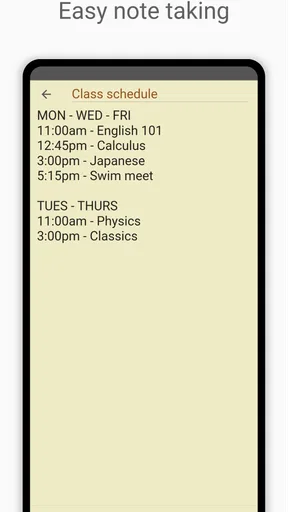
Creating a new note is as easy as pie. Just tap the plus sign, and you're typing away. The app's text editor is pleasantly intuitive, allowing you to focus on what really matters: your notes. Whether it's jotting down a quick idea or drafting a lengthy to-do list, Inkpad handles it all seamlessly.
Organizing Your Life
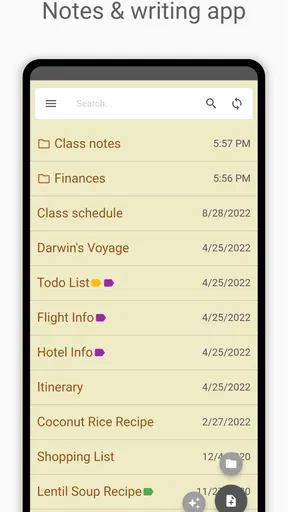
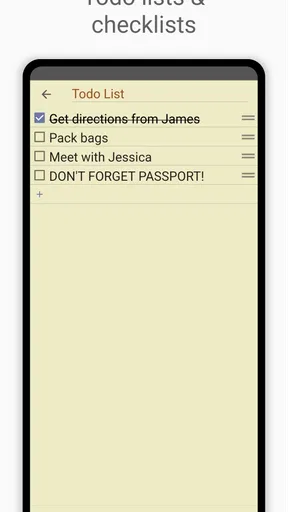
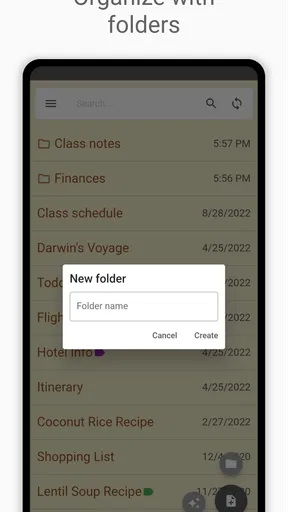
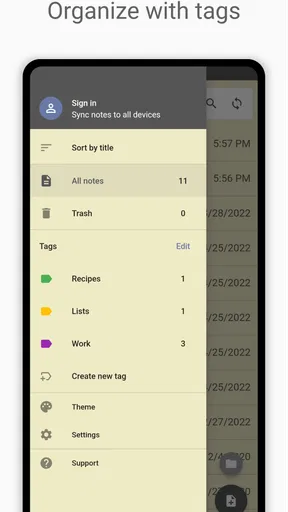
One of the standout features of Inkpad is its effortless organization system. You can create to-do lists and categorize notes, making it incredibly easy to find what you need when you need it. I found myself quickly sorting notes into different categories like work, personal, and shopping lists, which was a game-changer for keeping my thoughts orderly.
The app also allows for easy searching of notes. Need to find that brilliant idea you had last week? Just type a keyword in the search bar, and bam—there it is. This feature has saved my bacon on more than one occasion, especially when I’m in a hurry.
Sync Across Devices
Another fantastic feature is the ability to sync notes across devices. Imagine brainstorming on your phone and then seamlessly continuing on your tablet or computer. Inkpad makes this possible with its cloud sync feature. As someone who's always switching between devices, I find this incredibly convenient. Plus, knowing your notes are backed up in the cloud gives you peace of mind.
What syncing means in daily use
Cloud sync is most valuable when a note changes hands between moments, not just between screens. I can draft a short plan on my phone while away from home, then return to it on another device when I have more room to think. For anything important, I would still check that the latest change has appeared before relying on it elsewhere; sync is convenient, but it is sensible to verify a note after switching devices, especially if I have edited it in more than one place.
Offline access answers another practical question: can I still write when a connection drops? Yes, I can create notes and lists offline, with syncing expected once I am connected again. That makes the app useful on a commute or while traveling. I would not treat offline work as a reason to ignore backups altogether, though. If a note is critical, I would keep my own good habits and make sure it is available where I need it.
Customizable and User-Friendly
While Inkpad keeps things simple, it doesn't skimp on customization. You can tweak the app to your liking with various settings, like changing the font size for easier reading or setting up reminders for your to-do lists. I love being able to personalize the app to fit my workflow.
For those of us who love a little personalization, the app also offers themes. While I tend to stick with the default, it’s nice to have options to change things up now and then.
Small choices that make notes easier to use
Font size is more than a cosmetic setting when I am checking a list while walking through a shop or reading a note at a glance. I would choose a comfortable size first, then settle on a theme that stays easy to read in the places I actually use the app. The point is not to spend time decorating a notepad; it is to make the text easy to recognize and act on.
Reminders can help with a task that has a time-sensitive next step, but I would not put every item on a reminder. If everything prompts me, the alerts lose meaning. I reserve them for tasks I might genuinely forget, and keep ordinary shopping or brainstorming notes available without adding extra interruptions. That is a useful balance for anyone who wants a list app without letting it become another source of noise.
Offline Access
Ever find yourself in a spot with no internet access? No worries! Inkpad has got you covered with offline access. You can jot down notes and create lists without needing a connection, and everything will sync once you’re back online. This feature is a lifesaver when I'm traveling or in areas with spotty service.
Who will appreciate the simplicity
I think Inkpad is a good fit for students collecting quick class reminders, busy households coordinating errands, and anyone who wants a lightweight personal notepad. It is also useful for people who move between devices and want their notes to follow them, or who need to write while offline. Its best role is dependable everyday capture, not serving as the single system for every document, deadline, and long-term project.
I would choose a different tool if my work depended on extensive formatting, structured databases, team collaboration, or complex project tracking. Those needs call for features beyond the simple note-and-list routine that makes Inkpad attractive. Likewise, if I prefer one deeply organized archive with many layers of cross-references, a more specialized notes app may be a better match than sorting ordinary notes into categories and searching them later.
Value, expectations, and staying power
The app is free, with in-app purchases ranging from $1.99 to $239.99 per item. I would check the purchase details in the app before paying for anything and decide based on the specific benefit I need, rather than assuming that a paid option is necessary for basic note-taking. The useful question is whether the free experience already handles my routine; if it does, there is no reason to buy extras simply because they are offered.
Inkpad has been around since February 13, 2011, and that long presence gives it a place among established mobile notepads. I would not infer a particular feature history from its age, though. What matters to an existing user is whether the current app continues to fit their habits: can they find their notes, move between devices, and write when offline? Those are the practical signs I would watch as I decide whether to keep relying on it.
Final Thoughts
In conclusion, Inkpad Notepad & To do list is a gem of an app for anyone looking to organize their life with minimal fuss. Its user-friendly interface, robust organizational features, and seamless syncing make it a standout choice among note-taking apps. Whether you’re a student, professional, or just someone who loves staying organized, Inkpad is definitely worth a try.
And hey, since it's available for both Android and iOS, there's no excuse not to give it a whirl. So go ahead, download it, and start capturing those brilliant ideas today!
Verdict
Strengths of Inkpad Notepad & To do list
- User-friendly interface, easy navigation.
- Rich text formatting options available.
- Syncs seamlessly across devices.
- No internet required for basic use.
- Customizable themes and colors.
Limitations of Inkpad Notepad & To do list
- Limited free cloud storage space.
- No handwriting support available.
- Ads present in the free version.
- Limited collaboration features.
- No advanced reminder options.
Similar Picks in This Category
View All
Google Calendar
Google LLC4.6

Google Drive
Google LLC4.3

Google Assistant
Google LLC3.9

Microsoft OneDrive
Microsoft Corporation4.6

Samsung Calendar
Samsung Electronics Co., Ltd.4.1

Microsoft OneNote: Save Notes
Microsoft Corporation4.6
Frequently Asked Questions
What features does Inkpad Notepad & To Do List offer?
Inkpad Notepad & To Do List provides a simple and intuitive interface for creating notes, lists, and reminders. It offers cloud syncing, allowing you to access your notes from any device. Features include text formatting, voice-to-text capabilities, and password protection for sensitive notes, making it versatile for various user needs.
Is Inkpad Notepad & To Do List available for both Android and iOS devices?
Yes, Inkpad Notepad & To Do List is available for download on both Android and iOS platforms. Users can find the app on the Google Play Store for Android devices and the Apple App Store for iOS devices, ensuring compatibility with a wide range of smartphones and tablets.
Does Inkpad Notepad & To Do List require an internet connection to function?
While Inkpad Notepad & To Do List can be used offline for basic note-taking, an internet connection is needed for cloud syncing. This feature allows your notes and lists to be backed up and accessible across multiple devices, ensuring you never lose important information.
Are there any costs associated with using Inkpad Notepad & To Do List?
Inkpad Notepad & To Do List offers a free version that includes essential features. However, there is also a premium subscription available which unlocks additional features like ad-free usage, advanced syncing options, and enhanced security features. Prices and features may vary depending on the platform.
How secure is the data stored in Inkpad Notepad & To Do List?
Inkpad Notepad & To Do List prioritizes user privacy and data security. It offers password protection for individual notes and uses encryption for data stored in the cloud. Users are encouraged to use these features to keep their information safe from unauthorized access.
